
AI automation systems that reduce manual work and improve how your business actually runs.
I build automation systems that connect tools, remove repetitive tasks and improve workflows inside WooCommerce and WordPress setups. This is not about using automation tools in isolation, but about building a system that works reliably in real business conditions.
Some projects focus on AI systems and workflow automation. Others involve custom development, API connections or backend logic to make the automation actually work properly across the business.
Reduce manual admin, connect processes and improve how work moves through the business.
Use AI where it actually helps: support handling, data processing or structured workflows.
Built around your setup, not generic templates or disconnected automation tools.
AI automation here does not mean adding random tools. It means building systems that remove repeated work and improve how operations actually run.
In practice, that can mean automating repetitive admin, structuring how enquiries are handled, moving data between systems, improving internal workflows or building logic that connects different parts of the business more reliably.
Most automation projects start when the business is spending too much time on tasks that should already be handled by the system.
That usually shows up as repeated admin, disconnected tools, inconsistent handovers or workflows that depend too heavily on people instead of structure. In those situations, the issue is not “needing AI”. The issue is needing a better operating system behind the business.
This is why the work here is focused on practical implementation rather than generic automation setups. Some projects connect directly to WooCommerce, where automation supports orders, pricing, product handling or customer flow. Others connect to WordPress, where the goal is to improve leads, content operations, support flow or internal handling.
The result is not just a task running automatically. It is a system that reduces friction, creates consistency and makes the business easier to operate over time.
Automation, data flow and workflow logic
Systems that connect tools, move information automatically and reduce repetitive operational work across the business.
Not disconnected automation tools
The aim is not to stack tools for the sake of it. The aim is to build a workflow that is reliable, maintainable and commercially useful.
Less manual work, more control
Good automation reduces friction, improves consistency and gives the business a stronger technical structure to grow from.
AI automation is usually needed when the business is losing time through repeated tasks, disconnected workflows or avoidable manual handling.
Most businesses do not start by looking for automation. They start by noticing friction: too much admin, too many repeated actions, unclear handovers or systems that do not work together properly.
The problem is rarely the lack of tools. It is usually the lack of structure behind the work.
Businesses often already have enough tools. What they do not have is a reliable system for how work should move between them. That creates repeated admin, manual checks, duplicated actions and workflows that break as soon as the business grows.
AI automation becomes useful when it removes that friction. Instead of relying on people to repeat the same process every day, the workflow is structured so the system handles it more consistently in the background.
This is also why automation often overlaps with AI systems, WooCommerce and WordPress work where the business needs more than isolated tools.
Too much repetitive admin
Tasks that should already be handled automatically still depend on manual checking, copying or updating.
Disconnected systems
Data has to be moved manually between tools because the current setup does not connect properly.
Inconsistent workflows
Processes depend on the person doing them instead of running in a structured and predictable way.
Scaling without structure
What worked at a smaller stage becomes inefficient once order volume, enquiries or internal workload increase.
Different types of AI automation systems, depending on how the business operates.
Not every business needs the same type of automation. The right system depends on where time is being lost and how the workflow is currently structured.
Workflow automation for day-to-day operations
Automating repetitive internal processes such as order handling, notifications, task assignment or data updates across tools and systems.
Enquiry handling and lead workflow automation
Structuring how enquiries are received, processed and followed up using automation and AI-assisted workflows to improve response time and consistency.
Data processing and system integration
Moving data between systems, automating imports or structuring how information flows across platforms and tools.
WooCommerce automation and store workflows
Automation applied directly to WooCommerce stores, including order logic, product workflows and backend operations.
AI automation is most useful when it is tied to a real workflow that already exists inside the business.
The strongest projects do not start with “what can we automate?”. They start with a process that is already wasting time, creating friction or depending too heavily on manual handling.
Automation becomes commercially valuable when it improves something the team is already doing every day.
That may be processing orders, handling enquiries, moving information between tools, updating internal records or triggering actions after a customer event. The important part is not the automation itself. The important part is reducing repeated work and improving how the business runs behind the scenes.
In many cases, this also overlaps with WooCommerce, WordPress and broader AI systems work where the automation needs to be part of a larger technical setup.
This is why the best automation projects are not built as disconnected flows. They are designed as part of the actual operating system of the business.
Order and fulfilment workflows
Triggering internal actions after orders, updating statuses or structuring backend store operations more reliably.
Lead and enquiry handling
Routing enquiries, capturing lead data and creating cleaner follow-up workflows across the business.
Data movement between systems
Automating how information is passed between CRMs, websites, internal tools or operational platforms.
Support and repeated responses
Improving how repeated queries are handled so response workflows become faster and more consistent.
Good automation starts with understanding the workflow properly, not with choosing tools first.
The strongest automation systems are built around how the business already operates. That means identifying where time is being lost, what is repeated too often and what should move more reliably through the system.
The goal is not to automate everything. The goal is to automate the right parts of the workflow.
Some businesses need a simple workflow between two tools. Others need deeper automation across enquiries, internal processes or ecommerce operations. The right system depends on what is actually happening in the business, not on how many tools can be connected.
This is also why automation often overlaps with AI systems, WooCommerce and WordPress work where the automation needs to fit the wider technical structure.
Map the workflow
Understand how the process currently works, where delays happen and where repeated effort is creating friction.
Define what should be automated
Decide which parts of the process should run automatically and which still need human control.
Build the right automation layer
Use the right combination of automation logic, integrations and technical implementation to make the workflow reliable.
Refine around real usage
Adjust the system based on how it behaves in practice so it remains stable, useful and commercially relevant.
AI automation becomes clearer when you see how it works in real projects.
These are examples where automation, system structure and technical implementation improved how the business operates, not just how the website looks.
 SYSTEM
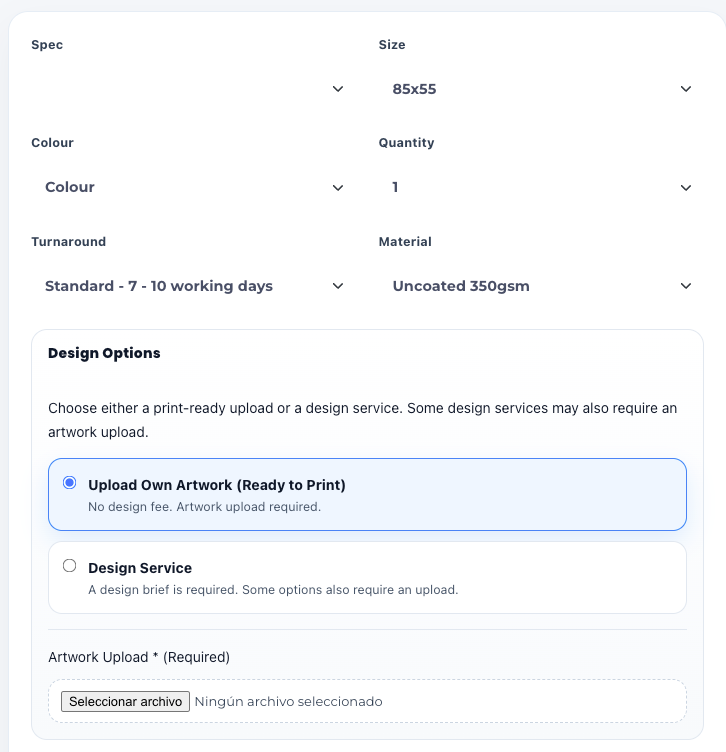
Automation and pricing logic for a WooCommerce print store
Manual pricing and configuration workflows were slowing down operations. A structured system was built to automate calculations and improve order flow.
View case study AUTOMATION
Automation system for multi-site property data workflows
Property data handling was inconsistent and manual. Automation improved data flow, consistency and operational reliability across sites.
View case studyCommon questions about AI automation and how it works in practice.
These are the questions that usually come up when businesses start thinking about automation. The focus is on what actually works in real setups.
What do you mean by AI automation?
It means building systems that handle repeated tasks automatically, connect tools and improve workflows across the business. This is usually part of a wider AI systems setup.
Is this just about tools like Zapier or Make?
Those tools can be used, but they are not the main focus. The important part is how the workflow is structured, not the tool itself.
Can automation be added to an existing WooCommerce or WordPress site?
Yes. Most projects are built on top of existing WooCommerce or WordPress setups.
What kind of tasks can be automated?
Order workflows, enquiries, lead handling, data movement, notifications and many internal processes that currently require manual work.
Will automation replace manual work completely?
No. The goal is to reduce unnecessary tasks so the business can focus on more important work.
What is the best way to get started?
The simplest way is to explain your current setup. From there, it becomes clear what should be automated and how to approach it.
If your business is losing time on manual work, the next step is understanding what should be automated.
The goal is not to automate everything. The goal is to remove the right friction and build a system that works more reliably.
This can involve AI systems, workflow automation, custom development or a combination of all three depending on how your setup currently works.
Start from the workflow
Identify where time is being lost before choosing any tool.
Build the right system
Automation, logic and structure designed around your setup.
Make it reliable
Systems that actually work in real business conditions.
Scale without friction
A better structure makes future growth easier to manage.