
Custom AI plugins built around real business logic, not generic features.
I build custom AI plugins for WooCommerce and WordPress when standard tools are not enough. This includes tailored functionality, workflow logic, AI-assisted processes and plugin-based systems designed around how the business actually operates.
Some projects need more than automation alone. They need custom plugin development that connects AI, workflow logic and platform-specific implementation into one structured system that works reliably in real use.
When the business needs something more specific than a generic plugin, AI tool or disconnected automation setup can provide.
Custom plugin features, AI-assisted workflows, backend logic, integrations and structured systems built directly into the platform.
Often connected with AI systems, AI automation and broader technical development.
Custom AI plugins are usually needed when the business requires logic that standard plugins, tools or automation layers cannot handle properly.
In practice, this means building plugin-based systems that support real workflows inside WooCommerce and WordPress. That can include tailored AI-assisted features, backend logic, structured data handling, custom processes or platform-specific behaviour designed around how the business actually works.
Most projects start when the platform needs something more precise than a generic plugin can deliver.
Some businesses need AI-assisted logic built directly into product workflows, admin tools, lead handling or internal systems. Others need custom plugin development because their process does not fit standard plugin assumptions, even when AI or automation is part of the solution.
That is why the focus here is not on adding AI features as a layer on top. The focus is on building a plugin-based system that fits the workflow properly, integrates with the platform correctly and remains reliable over time.
In many cases, this also overlaps with AI automation, WooCommerce development and WordPress development, especially where the plugin needs to support a wider technical structure.
Plugin logic, AI-assisted features and structured workflows
Custom functionality built directly into the platform when the business needs more than off-the-shelf behaviour.
Not a generic AI add-on
The aim is not to install another plugin with an AI label. The aim is to build something that fits the workflow and solves the right problem.
Better fit, more control, less technical friction
Good custom plugin work makes the platform easier to operate and avoids forcing the business into generic limitations.
Custom AI plugins are usually needed when the platform cannot support the required workflow without workarounds, limitations or unnecessary complexity.
Most businesses do not start by asking for a custom AI plugin. They reach a point where generic plugins, disconnected tools or standard automation no longer match how the platform needs to behave.
The issue is rarely “needing AI”. The issue is needing the platform to behave in a way standard tools cannot support properly.
That often appears when product logic is too specific, workflows depend on unusual rules or the platform needs more structured behaviour than generic plugins can provide. In those situations, the business ends up forcing the process through tools that were never designed for it.
Custom AI plugin development makes sense when the business needs tighter control over how WooCommerce or WordPress behaves, especially where the workflow connects automation, platform logic and internal processes.
This is also why plugin work often overlaps with AI automation, WooCommerce and WordPress projects where the platform itself needs deeper technical structure.
Generic plugins are not enough
The required logic is too specific to be handled cleanly by standard off-the-shelf plugin behaviour.
Too many workarounds
The current setup depends on patches, multiple tools or manual intervention to do what the platform should already support.
Platform behaviour needs more control
The business needs more precise logic around products, workflows, users, support flow or internal operations.
Automation alone does not solve it
Some workflows need plugin-level implementation inside the platform, not just external automation layers.
Different types of custom AI plugins, depending on how the platform needs to behave.
Not every project needs the same type of plugin. The structure depends on what the business is trying to achieve and how the workflow needs to function inside WooCommerce or WordPress.
Custom product, pricing and checkout logic
Plugins that control how products behave, how pricing is calculated or how checkout workflows are structured inside WooCommerce.
AI logic integrated into platform behaviour
Plugins that use AI to support workflows such as content handling, support flow, lead processing or internal system logic.
Admin tools and internal workflow plugins
Custom tools inside WordPress or WooCommerce that improve internal processes, reduce manual work and structure backend operations.
Plugins connecting systems, APIs and data flows
Custom integrations that connect external tools, CRMs, APIs or internal systems directly into the platform in a structured way.
Custom AI plugins are most valuable when they solve a specific problem inside the platform that cannot be handled cleanly in any other way.
These are examples of situations where custom plugin development becomes the right solution because the business needs more control, more precision or more structured behaviour inside WooCommerce or WordPress.
The strongest plugin projects are built around a real operational constraint, not around adding new features.
That may be a pricing system that cannot be handled by standard WooCommerce logic, a workflow that requires specific automation inside the platform or a process that depends on custom interaction between data, users and actions.
In these situations, the solution is not another plugin or tool. The solution is a controlled piece of functionality built specifically for that use case.
This is why custom plugin work often connects with AI systems, automation and broader technical development.
Advanced pricing systems
Complex pricing rules, product configuration logic or calculation systems that standard WooCommerce cannot support cleanly.
Custom workflow behaviour
Processes that require specific actions, conditions or triggers inside the platform based on business logic.
AI-assisted internal tools
Backend features that support internal workflows using AI for processing, classification or structured decision logic.
Platform integrations
Connecting APIs, CRMs or external systems directly into WooCommerce or WordPress with custom plugin logic.
Custom AI plugins are built by understanding the system first, then defining the right logic before writing any code.
Most projects do not fail because of development. They fail because the logic behind them is not properly defined. The process focuses on clarity first, then implementation.
The goal is not to build a plugin. The goal is to make the platform behave exactly as the business needs.
Some plugins are small and focused. Others become core parts of the system. What matters is that the logic is correct, the behaviour is predictable and the plugin integrates cleanly into the platform.
This is also why plugin work often connects with AI systems, automation and broader WooCommerce or WordPress development.
Understand the workflow
Analyse how the process works and what the platform needs to support.
Define the logic clearly
Structure the behaviour, rules and interactions before development starts.
Build and integrate
Develop the plugin and connect it properly into the platform environment.
Refine based on real use
Adjust the behaviour once the system is in use to ensure reliability and long-term performance.
Custom AI plugins make more sense when you see how they are used in real projects.
These examples show how custom plugin development, automation and system logic are applied in real business situations, not just theoretical use cases.
 CUSTOM PLUGIN
Custom pricing plugin for complex WooCommerce workflows
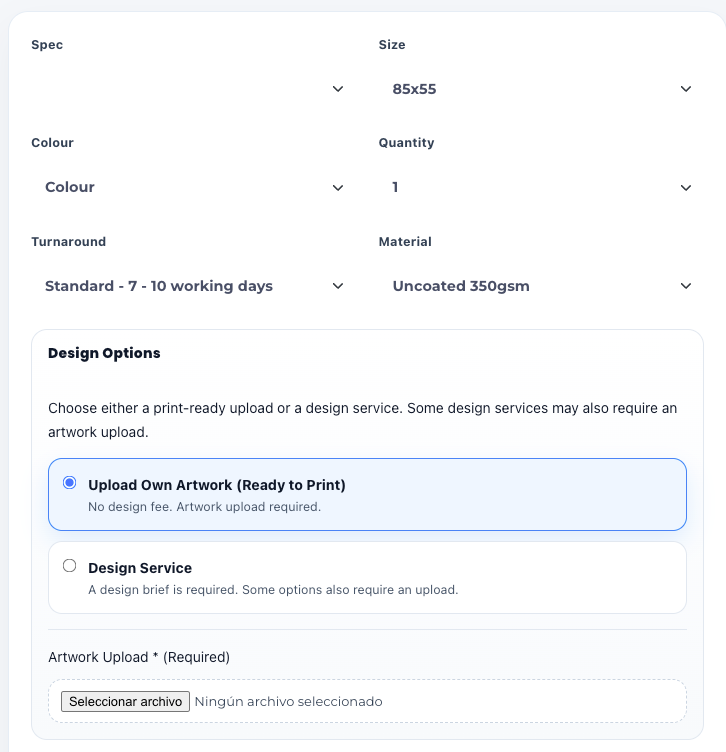
Standard WooCommerce pricing was not enough. A custom plugin was built to handle advanced pricing logic, product configuration and automated calculations.
View case study SYSTEM
Custom system for property data processing and workflow automation
A structured system was developed to handle property data, automate workflows and improve consistency across multiple WordPress sites.
View case studyCommon questions about custom AI plugins and how they work in practice.
These are the questions that usually come up when businesses realise standard plugins are not enough and a more tailored solution is needed.
What is a custom AI plugin?
A custom AI plugin is functionality built specifically for your WooCommerce or WordPress setup. It combines platform logic, automation and AI-assisted features to support your workflow properly.
When do I need a custom plugin instead of a standard one?
When your process does not fit what existing plugins can handle cleanly. This often happens with complex pricing, custom workflows or platform behaviour that requires more control.
Can this be added to an existing website?
Yes. Most custom plugins are built to work inside an existing WooCommerce or WordPress setup.
Does this replace automation tools?
Not necessarily. In many cases, custom plugins work alongside automation systems, but handle the parts that need to live inside the platform itself.
Are custom plugins harder to maintain?
Not when they are built properly. A well-structured plugin is often more stable than relying on multiple generic tools and workarounds.
What is the best way to start?
The best starting point is to explain your current setup. From there, it becomes clear whether a custom plugin is the right solution and how it should be structured.
If your platform needs behaviour that standard plugins cannot support, the next step is defining the right logic.
In many cases, the problem is not missing features. It is that the platform cannot handle the workflow properly. That is where custom plugin development becomes the right solution.
This can involve AI systems, automation, custom logic or a combination of all three depending on how your setup currently works.
Start from the problem
Define what the platform needs to do, not what tools to use.
Build the right logic
Custom plugin behaviour designed around your workflow.
Integrate properly
Clean implementation inside WooCommerce or WordPress.
Scale without limitations
A system that grows with the business instead of restricting it.